
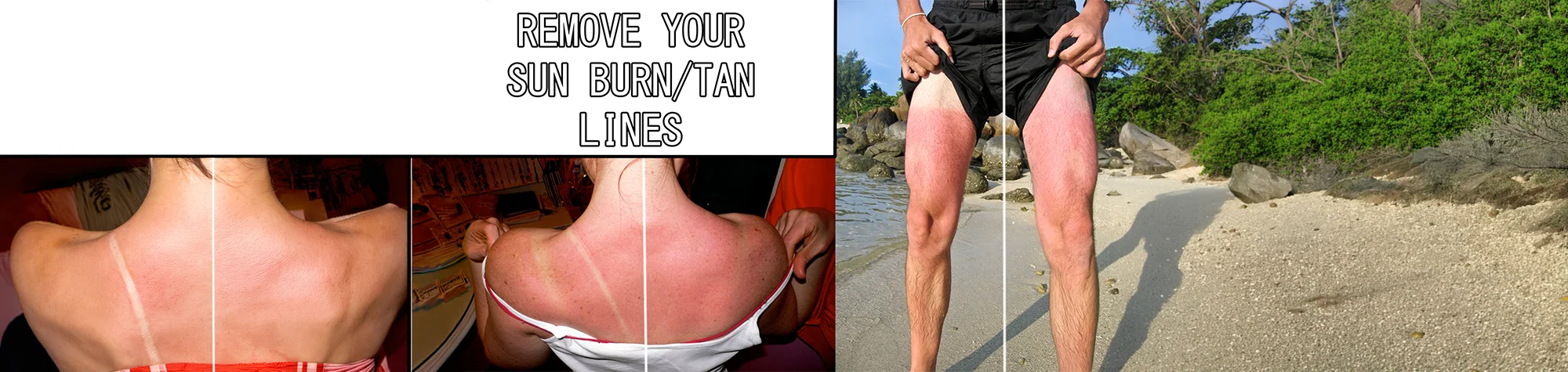
Remove Tan Lines in Photoshop
Bad tan lines can easily ruin an otherwise great holiday photo. Uneven skin tones often stand out more in pictures than in real life, but Photoshop makes them easy to fix.
In this tutorial, you’ll learn how to remove tan lines in Photoshop and blend skin tones naturally. Using simple retouching techniques, you can correct bad tans quickly and make your photos look smooth, clean, and realistic.
Watch the Tan Lines Photoshop Tutorial
Watch the full tutorial below to see how to remove tan lines step by step using Photoshop.
What You’ll Learn in This Tutorial
In this lesson, you will learn how to:
-
Remove harsh tan lines from skin
-
Blend uneven skin tones naturally
-
Retouch skin without losing texture
-
Fix bad holiday tans quickly and cleanly
-
Create realistic, professional results
Who This Tutorial Is For
This tutorial is ideal for:
-
Photoshop beginners
-
Portrait retouchers
-
Holiday and travel photographers
-
Anyone fixing skin tone issues in photos
Where You Can Use This Effect
Tan line removal works perfectly for:
-
Holiday and beach photos
-
Portrait photography
-
Social media images
-
Client retouching work
-
Personal photo collections
Professional Photoshop Editing Services
If you’d prefer a professional touch, I offer Photoshop retouching services for portraits, holiday photos, and advanced skin corrections.
Attribution and Licensing
Creative Commons CC BY-SA 2.0/Kelly Sue DeConnick: https://www.flickr.com/photos/kellysue/131417495/sizes/o/
End Music: Wallpaper Kevin MacLeod (incompetech.com). Licensed under Creative Commons: By Attribution 3.0 License http://creativecommons.org/licenses/by/3.0/
Subscribe for More Photoshop Tutorials
Subscribe to my YouTube channel for more Photoshop tutorials, photo retouching tips, and professional editing techniques.