
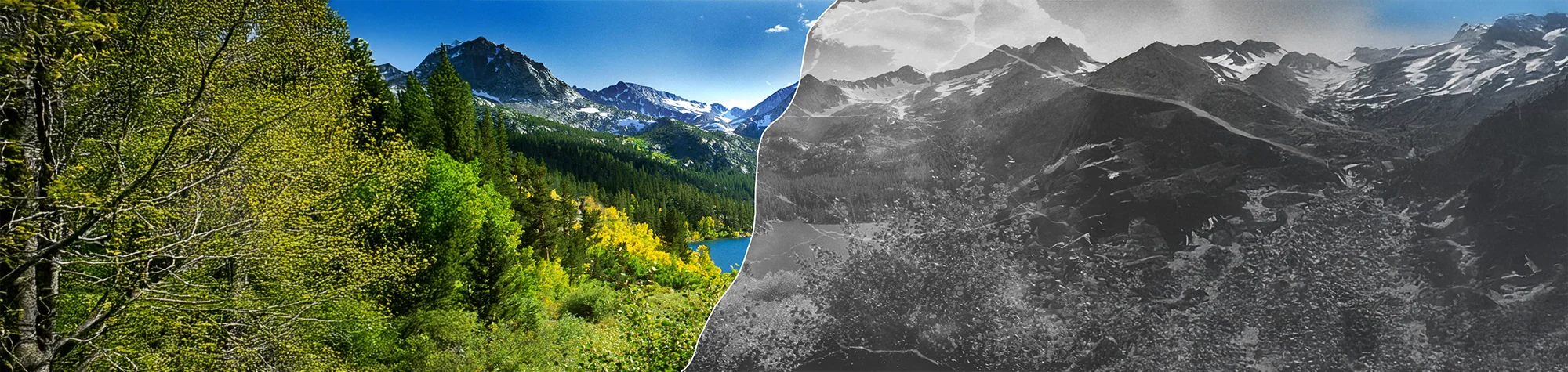
Cracked Old Photo Effect Photoshop Tutorial
Transform your photos into historic, vintage-looking images with a cracked old photo effect in Photoshop. In this tutorial, you will learn how to apply cracked textures and adjustment layers to give your pictures a realistic aged appearance.
This technique is perfect for portraits, landscapes, and creative projects where you want your photos to look like they’ve come straight out of history.
Watch the Cracked Old Photo Photoshop Tutorial
Watch the full tutorial below to learn how to create the cracked old photo effect step by step.
What You’ll Learn in This Tutorial
In this lesson, you will learn how to:
-
Apply cracked textures to photos
-
Use adjustment layers for color and tone
-
Create a realistic vintage appearance
-
Fine-tune details for authenticity
Who This Tutorial Is For
This tutorial is ideal for:
-
Photoshop beginners and intermediates
-
Designers creating vintage graphics
-
Photographers exploring historical or aged styles
-
Anyone adding aged textures to photos
Creative Uses for the Cracked Old Photo Effect
This effect works well for:
-
Vintage-style portraits
-
Old photo recreations
-
Creative storytelling images
-
Historical or themed photo projects
Professional Photoshop Editing Services
If you want professionally applied cracked old photo effects or vintage photo edits, I offer Photoshop editing services for personal and commercial projects.
Attribution and Licensing
Photos courtesy of and copyright Free Range Stock, www.freerangestock.com. Author: Leland Davis. https://freerangestock.com/details.php?gid=41&pid=1964&sgid
CC BY 2.0/RB PM Stock: https://www.flickr.com/photos/rbphotomanipulators/4914655319/sizes/l/
End Music: Wallpaper Kevin MacLeod (incompetech.com). Licensed under Creative Commons: By Attribution 3.0 License http://creativecommons.org/licenses/by/3.0/
Subscribe for More Photoshop Tutorials
Subscribe to my YouTube channel for more Photoshop tutorials, vintage effects, and professional editing tips.