
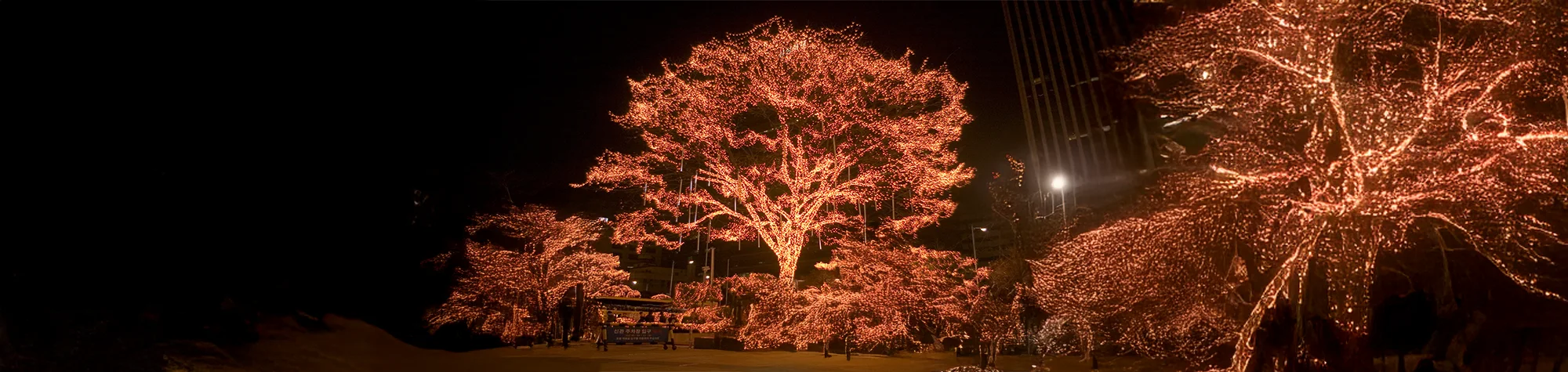
Add Christmas Lights in Photoshop
Make your photos feel truly Christmassy by adding bright, colourful Christmas lights in Photoshop. You can apply these festive lights to any photo, whether you want to jazz up house shots or add sparkle to a Christmas tree.
In this tutorial, you will learn how to create a custom Christmas lights brush, allowing you to apply lights quickly and easily. Once you’ve set it up, you can add festive lighting in seconds—leaving you more time to wrap those gifts
Watch the Christmas Lights Photoshop Tutorial
Watch the full tutorial below to see how to create and apply Christmas lights step by step.
What You’ll Learn in This Tutorial
In this lesson, you will learn how to:
-
Add colourful Christmas lights to photos
-
Create a custom Photoshop brush
-
Control light colour, size, and placement
-
Add festive sparkle to holiday images
Who This Tutorial Is For
This tutorial is perfect for:
-
Photoshop beginners
-
Photographers editing holiday photos
-
Designers creating festive graphics
-
Anyone wanting quick Christmas effects
Where You Can Use This Effect
Christmas light effects work great for:
-
Holiday home photos
-
Christmas tree images
-
Social media posts
-
Seasonal marketing designs
Professional Photoshop Editing Services
If you want professionally edited Christmas photos or custom festive effects, I offer Photoshop editing services for individuals and businesses.
Attribution and Licensing
CC BY-SA 2.0/~Mers: https://www.flickr.com/photos/barnkim/4169955337/sizes/l.
CC BY-SA 3.0/Diliff: https://commons.wikimedia.org/wiki/File:Prague_Old_Town_Square,_Czech_Republic_-_Oct_2010.jpg
CC BY 2.0/Smabs Sputzer: https://www.flickr.com/photos/10413717@N08/6597205233/sizes/l
CC BY 2.0/David Wiley: https://www.flickr.com/photos/davidwiley/73195291/sizes/o/
End Music: Wallpaper Kevin MacLeod (incompetech.com). Licensed under Creative Commons: By Attribution 3.0 License http://creativecommons.org/licenses/by/3.0/

Subscribe for More Photoshop Tutorials
Subscribe to my YouTube channel for more Photoshop tutorials, festive effects, and professional editing tips.