
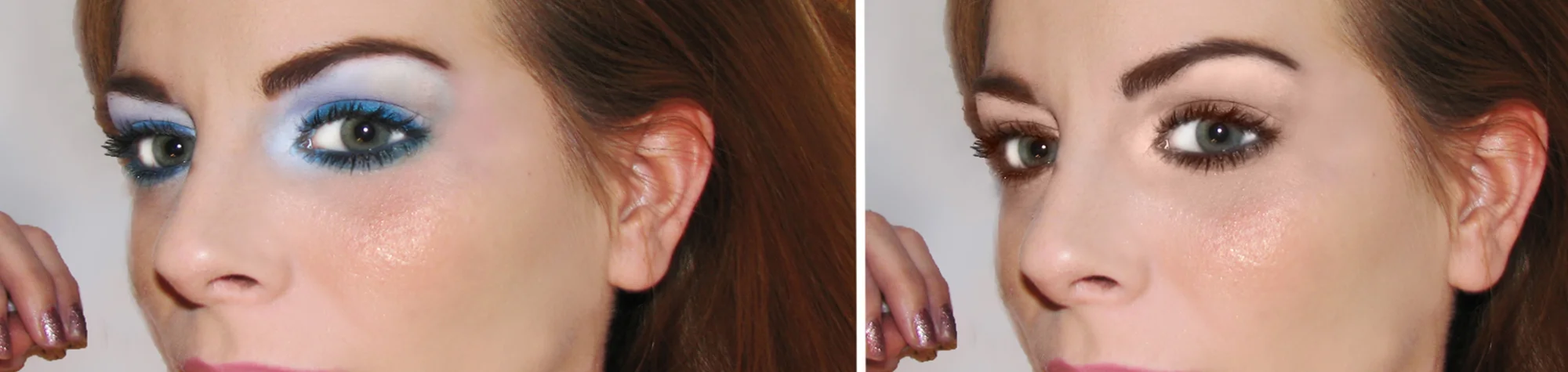
Remove Makeup in Photoshop
Sometimes makeup doesn’t photograph the way you expect, and instead of enhancing a portrait, it can distract from it. Photoshop gives you full control to fix that quickly.
In this tutorial, you’ll learn how to remove makeup in Photoshop using a fast and effective technique that works on all portrait photos. You can strip away unwanted makeup, clean up the skin, and then reapply makeup you actually like—without damaging the original image.
Watch the Remove Makeup Photoshop Tutorial
Watch the full tutorial below to see how to remove makeup step by step in Photoshop.
What You’ll Learn in This Tutorial
In this lesson, you will learn how to:
-
Remove makeup in Photoshop naturally
-
Clean skin without losing texture
-
Work quickly using simple adjustments
-
Prepare portraits for makeup reapplication
-
Improve overall portrait quality
Who This Tutorial Is For
This tutorial is perfect for:
-
Photoshop beginners
-
Portrait photographers
-
Photo retouchers
-
Anyone editing beauty or fashion photos
Where You Can Use This Effect
Makeup removal techniques work great for:
-
Portrait photography
-
Beauty retouching
-
Fashion images
-
Profile photos
-
Professional headshots
Professional Photoshop Editing Services
If you want professional portrait retouching or natural skin corrections applied to your photos, I offer Photoshop editing services for individuals and businesses.
Attribution and Licensing
Creative Commons CC BY 2.0/Courtney Rhodes: https://www.flickr.com/photos/pumpkincat210/4367493492/sizes/l
End Music: Wallpaper Kevin MacLeod (incompetech.com). Licensed under Creative Commons: By Attribution 3.0 License http://creativecommons.org/licenses/by/3.0/
Subscribe for More Photoshop Tutorials
Subscribe to my YouTube channel for more Photoshop tutorials, portrait retouching techniques, and professional editing tips.