
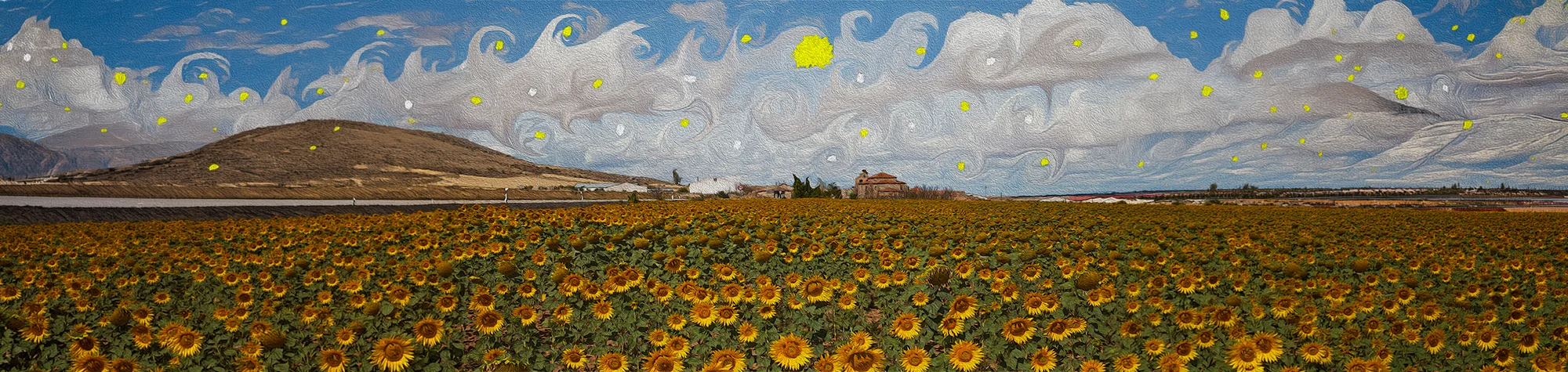
Van Gogh Effect Photoshop Tutorial
Van Gogh’s paintings have inspired artists for generations. In this Photoshop tutorial, you will learn how to turn your photos into an impressionist style painting inspired by Vincent Van Gogh’s iconic artwork, including Starry Night.
This effect is easier to create than you might expect and works well on landscapes and architectural images. You can achieve a painted look while keeping full control over the final result.
Watch the Van Gogh Effect Photoshop Tutorial
Watch the full tutorial below to learn how to create the Van Gogh painting effect in Photoshop step by step.
Using Pixel Bender (Photoshop CS5 Users)
If you use Photoshop CS5, you can follow along by using the Pixel Bender filter. This filter helps create the painterly brush strokes needed for the Van Gogh-style effect.
You can download the Pixel Bender filter here:
What You Need Before You Start
To follow this tutorial, you will need:
-
Adobe Photoshop
-
A suitable photo (landscapes work best)
-
Basic understanding of filters and layers
This tutorial suits beginners and intermediate users.
Creative Uses for the Van Gogh Effect
This effect works well for:
-
Artistic photo transformations
-
Wall art and prints
-
Creative portfolios
-
Digital paintings
Who This Tutorial Is For
This tutorial is ideal for:
-
Photoshop learners
-
Digital artists
-
Photographers exploring artistic styles
-
Anyone inspired by classic paintings
Professional Photoshop Artwork Services
If you want custom artistic photo edits or painted-style artwork, I offer professional Photoshop editing services for personal and commercial projects.
Attribution and Licensing
Diego Delso, Wikimedia Commons, License CC BY-SA 3.0: https://commons.wikimedia.org/wiki/File:Iglesia_de_Nuestra_Se%C3%B1ora_de_La_Blanca,_Cardej%C3%B3n,_Espa%C3%B1a,_2012-09-01,_DD_02.JPG
End Music: Wallpaper Kevin MacLeod (incompetech.com). Licensed under Creative Commons: By Attribution 3.0 License http://creativecommons.org/licenses/by/3.0/

Subscribe for More Photoshop Tutorials
Subscribe to my YouTube channel for more Photoshop tutorials, creative effects, and professional editing techniques.