
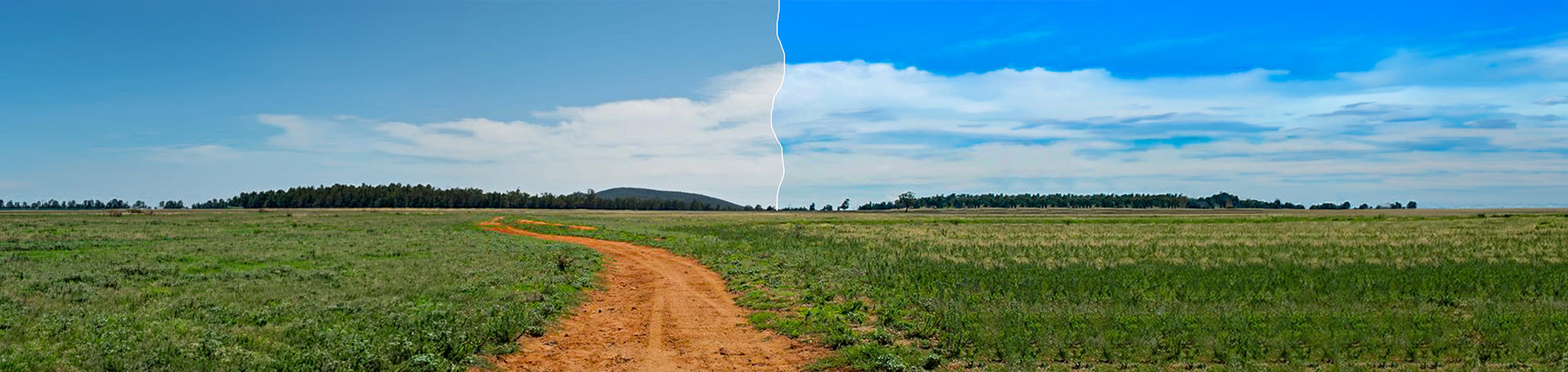
Vivid Sky Effect in Photoshop
In this tutorial, you’ll learn how to create a vivid sky effect in Adobe Photoshop and bring life back into dull or flat skies.
This technique helps you boost colour, contrast, and clarity in the sky while keeping the rest of the image balanced. You can apply this effect to landscapes, cityscapes, and outdoor photos to instantly improve their overall impact.
The process is quick, flexible, and works on most images.
Watch the Vivid Sky Photoshop Tutorial
Watch the full tutorial below to see how to brighten and enhance skies step by step.
What You’ll Learn in This Tutorial
In this tutorial, you will learn how to:
-
Create a vivid sky effect in Photoshop
-
Enhance sky colour and contrast
-
Brighten dull skies naturally
-
Blend adjustments smoothly
-
Apply the effect to different photos
Who This Tutorial Is For
This tutorial is perfect for:
-
Photoshop beginners
-
Landscape photographers
-
Photo editors
-
Designers working with outdoor images
-
Anyone wanting better-looking skies
Where You Can Use This Effect
The vivid sky effect works great for:
-
Landscape photography
-
Travel photos
-
Outdoor portraits
-
Social media images
-
Digital artwork
Professional Photoshop Editing Services
If you’d like your skies professionally enhanced or need custom photo editing, I offer Photoshop editing services for individuals and businesses.
Attribution and Licensing
Images are used under the SXC License
Background Music: Sovereign Kevin MacLeod (incompetech.com). Licensed under Creative Commons: By Attribution 3.0 License http://creativecommons.org/licenses/by/3.0/
Subscribe for More Photoshop Tutorials
Subscribe to my YouTube channel for more Photoshop tutorials, photo enhancement tips, and creative effects.