
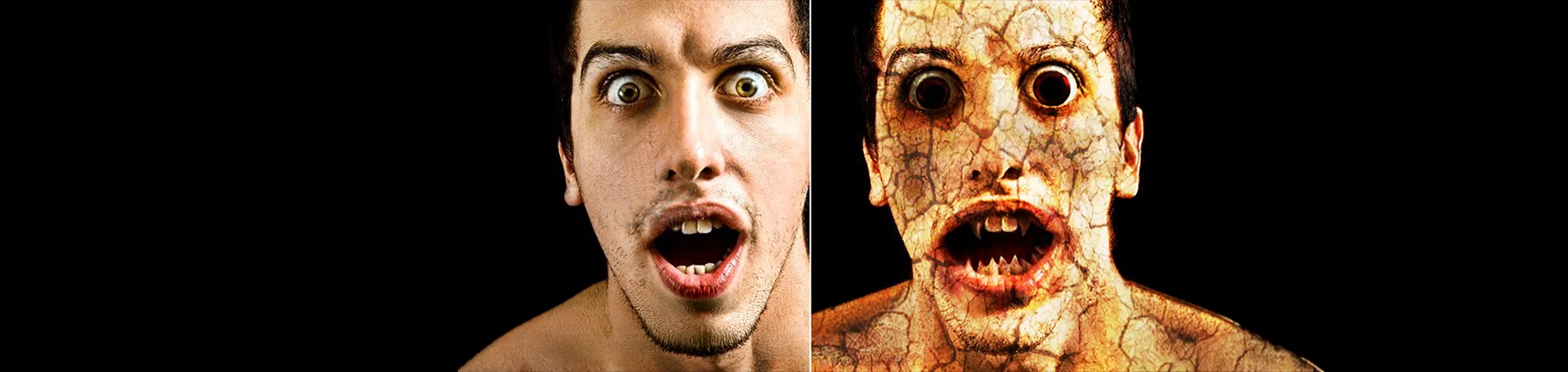
Zombie Effect Photoshop Tutorial
Have you ever wondered what you would look like as a zombie? With Photoshop, you can transform yourself, friends, or family into terrifying, brain-eating undead characters in just a few simple steps.
In this tutorial, you will learn how to create a realistic zombie effect in Photoshop, using techniques that add decayed skin, dark tones, and dramatic detail. This effect is fun, creative, and perfect for themed projects or special effects practice.
Watch the Zombie Effect Photoshop Tutorial
Watch the full tutorial below to see how to create the zombie effect step by step.
What You’ll Learn in This Tutorial
In this lesson, you will learn how to:
-
Create a realistic zombie skin effect
-
Add dark, decayed tones to portraits
-
Enhance facial details for a horror look
-
Transform ordinary photos into undead characters
Who This Tutorial Is For
This tutorial is ideal for:
-
Photoshop beginners
-
Creative photo editors
-
Special effects enthusiasts
-
Anyone wanting to create horror-style images
Creative Uses for the Zombie Effect
I am text block. Click edit button to change this text. Lorem ipsum dolor sit amet, consectetur adipiscing elit. Ut elit tellus, luctus nec ullamcorper mattis, pulvinar dapibus leo.
Professional Photoshop Editing Services
If you want professionally created zombie effects or advanced photo manipulations, I offer Photoshop editing services for personal and commercial projects.
Attribution and Licensing
End Music: Wallpaper Kevin MacLeod (incompetech.com). Licensed under Creative Commons: By Attribution 3.0 License http://creativecommons.org/licenses/by/3.0/
Subscribe for More Photoshop Tutorials
Subscribe to my YouTube channel for more Photoshop tutorials, creative effects, and professional editing techniques.