
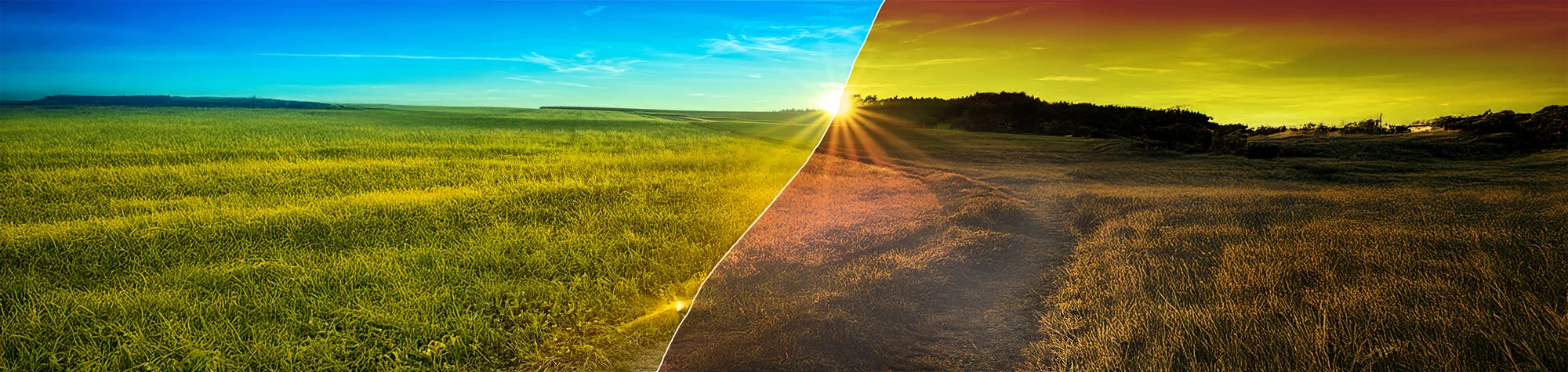
Create an Atmospheric Landscape in Photoshop
Early morning landscapes have a calm, atmospheric feel that instantly draws you in—but getting up at sunrise isn’t always an option. The good news is that you can recreate this look easily in Photoshop.
In this tutorial, you’ll learn how to create a stunning atmospheric landscape using just three simple adjustment layers. The effect is quick to apply, incredibly effective, and works beautifully on a wide range of landscape photos.
Watch the Atmospheric Landscape Photoshop Tutorial
Watch the full tutorial below to see how to create this moody, early-morning landscape effect step by step.
What You’ll Learn in This Tutorial
In this lesson, you will learn how to:
-
Create a soft, atmospheric mood in landscapes
-
Simulate early morning lighting
-
Use only three adjustment layers
-
Control contrast, colour, and depth
-
Enhance landscapes quickly and naturally
Who This Tutorial Is For
This tutorial is perfect for:
-
Photoshop beginners
-
Landscape photographers
-
Photo editors wanting fast results
-
Anyone creating moody scenery images
Where You Can Use This Effect
This atmospheric effect works great for:
-
Landscape photography
-
Wall art and prints
-
Social media images
-
Website and banner visuals
Professional Photoshop Editing Services
If you’d like professionally edited landscape photos or custom atmospheric effects applied to your images, I offer Photoshop editing services for individuals and businesses.
Attribution and Licensing
rgbstock.com/Andreas Krappweis: http://www.rgbstock.com/bigphoto/nVIsHdW%2FGolden%2BSummer%2BMeadows%2B-%2BSunset
Some images are used under the SXC License
Background Music: Sovereign Kevin MacLeod (incompetech.com). Licensed under Creative Commons: By Attribution 3.0 License http://creativecommons.org/licenses/by/3.0/
Subscribe for More Photoshop Tutorials
Subscribe to my YouTube channel for more Photoshop tutorials, landscape effects, and professional photo editing tips.