
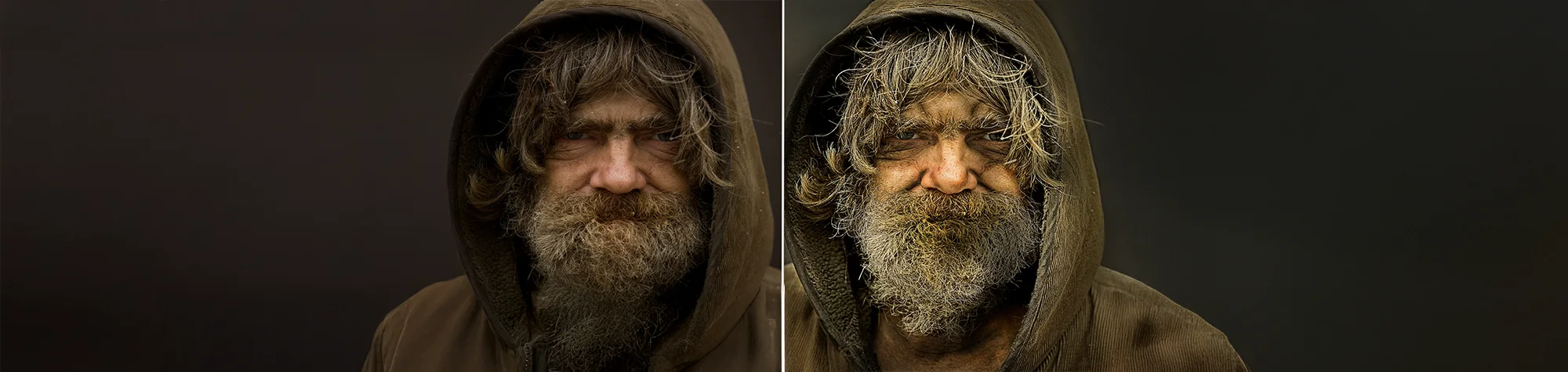
Create the Dragan Effect in Photoshop
The Dragan Effect is a popular portrait style known for its gritty, dramatic look and enhanced detail. It works especially well on portraits where you want to bring out texture, contrast, and emotion.
In this tutorial, you’ll learn how to create the Dragan Effect in Photoshop using a fast and simple workflow. Once you understand the technique, you can apply it to portraits to give them a bold, rustic feel that really makes details pop.
Watch the Dragan Effect Photoshop Tutorial
Watch the full tutorial below to see how to create the Dragan Effect step by step.
What You’ll Learn in This Tutorial
In this lesson, you will learn how to:
-
Create the Dragan Effect in Photoshop
-
Add dramatic contrast and texture to portraits
-
Enhance facial detail without overdoing it
-
Use adjustment layers for non-destructive editing
-
Achieve a gritty, professional portrait style
Who This Tutorial Is For
This tutorial is ideal for:
-
Photoshop beginners
-
Portrait photographers
-
Photo retouchers
-
Anyone wanting dramatic portrait effects
Where You Can Use This Effect
The Dragan Effect works great for:
-
Portrait photography
-
Fashion and editorial images
-
Black and white conversions
-
Artistic photo projects
-
Social media portraits
Professional Photoshop Editing Services
If you want professionally edited portraits using the Dragan Effect or other advanced Photoshop techniques, I offer Photoshop editing services for individuals and businesses.
Attribution and Licensing
Images are used under the SXC License
Background Music: Sovereign Kevin MacLeod (incompetech.com). Licensed under Creative Commons: By Attribution 3.0 License http://creativecommons.org/licenses/by/3.0/
Subscribe for More Photoshop Tutorials
Subscribe to my YouTube channel for more Photoshop tutorials, portrait effects, and professional photo editing tips.