
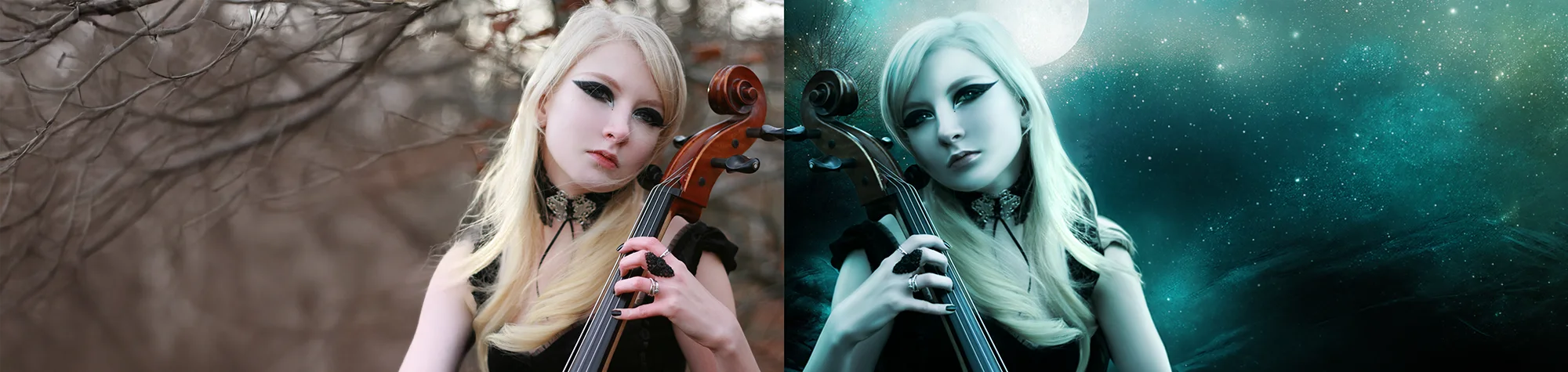
Night Time Composite & Skin Retouching in Photoshop
Create a stunning night time artwork in Photoshop while learning to retouch skin with a smooth, painting-like finish. This tutorial walks you through compositing multiple stock photos, enhancing lighting, adjusting colours, and producing a polished fantasy-style image.
Follow along with both the video and the written tutorial to explore techniques not fully covered in the written version, and give credit to the original creators of the images used.
Watch the Night Time Composite Photoshop Tutorial
Watch the full tutorial below to see how to composite the night scene, retouch skin, and apply lighting effects step by step.
What You’ll Learn in This Tutorial
In this lesson, you will learn how to:
-
Composite multiple stock images into a single night time scene
-
Retouch skin for a smooth, painterly effect
-
Apply realistic lighting and colour adjustments
-
Blend layers for a natural, cohesive look
-
Enhance fantasy artwork with detailed effects
Who This Tutorial Is For
This tutorial is ideal for:
-
Photoshop enthusiasts and beginners
-
Digital artists creating fantasy artwork
-
Photographers wanting artistic retouching
-
Designers working on composites and special effects
Where You Can Use This Effect
Night time composite and skin retouching techniques work great for:
-
Digital artwork
-
Portrait enhancements
-
Fantasy and sci-fi projects
-
Social media content and portfolios
-
Creative design projects
Professional Photoshop Editing Services
If you want professional compositing or artistic Photoshop effects applied to your photos, I offer editing services for individuals and businesses.
Attribution and Licensing
© Paula Veronica Busto Courtois/Deviant Art: http://darkdevil16.deviantart.com/art/Foggy-Forest-Stock-273653117
© Joanna/Deviant Art: http://joannastar-stock.deviantart.com/art/fantasy-sky-bg-02-59340548
© Chantel/Deviant Art: http://ischarm-stock.deviantart.com/art/Ischarm-Moon-Brushes-001-25678773
© Dan LuVisi/Deviant Art: http://danluvisiart.deviantart.com/art/My-Brush-Pack-118954791
© Maria Amanda & Rune/Deviant Art: http://mariaamanda.deviantart.com/art/Gothic-stock-273671889
textures.com (Terms of Use): http://www.textures.com/download/fireworks0005/21862, Image 5
Background Music: Sovereign Kevin MacLeod (incompetech.com). Licensed under Creative Commons: By Attribution 3.0 License http://creativecommons.org/licenses/by/3.0/
Subscribe for More Photoshop Tutorials
Subscribe to my YouTube channel for more Photoshop tutorials, compositing techniques, and professional editing tips.